
Browser extension for organizing tabs and bookmarks
Keep every tab in order with Tabka
A tidy space for storing and working with your tabs. Build structures for different projects, customize the look, and switch between them in a click.
Install TabkaFree. Simple. Organized.Organize and work with your tabs
All your tabs in one place: save quickly, find instantly, organize easily.

A new tab page, reinvented
Tabka replaces your default new tab page and brings all your tabs together in one place.

Flexible structure
Create workspaces, pages, and bookmark folders
— build the system that works for you.

Save bookmarks in one click
Save the current page right from the extension popup
— no extra steps, no switching tabs.


Open folders as tab groups
Open an entire folder with one click — the tabs open straight into a browser tab group.

Import bookmarks from your browser
Bring your existing browser bookmarks into Tabka and organize them into workspaces and folders right away.
Make Tabka yours
Choose how pages look, how bookmarks are displayed, and pick a color scheme that fits your style.
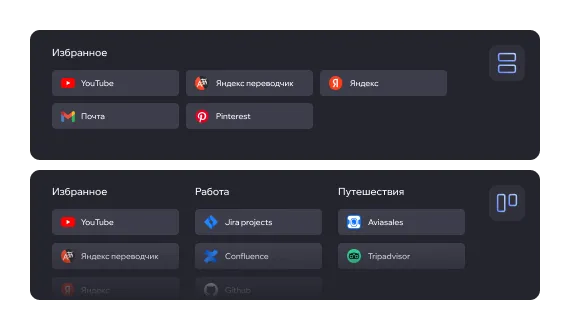
Two page views
Kanban — for visual planning
List — for a compact, quick overview
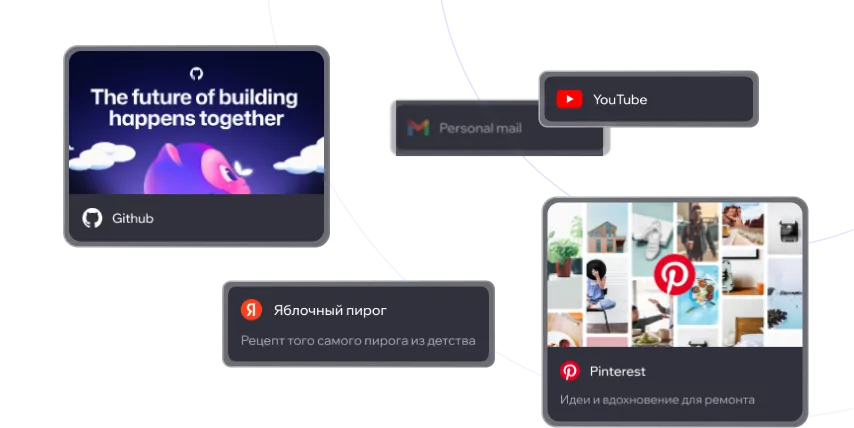
Customizable bookmark cards
Choose what to show: title, image, and note —
in any combination.
Previews are generated automatically, or you can upload your own image.

Workspace color themes
6 color options for quickly telling projects and tasks apart at a glance.


Theme switcher
Comfortable to use after dark. Light theme coming in a future release.
TABKA COMMUNITY
Help choose what we build next
Vote for future features, suggest ideas, and follow the progress from plan to release.

Collaboration
Work together with ease: invite teammates and share pages.
 Soon
SoonShared access
Invite teammates to your workspace, set roles and permissions. Work together as a team and get the most out of Tabka.

Public read-only link
Share your pages with others via a public link.
People can view your folders and bookmarks, but can't edit them.
FAQ
Answers to the most common questions. Didn't find what you need? Check out our Tabka guide.
 Is it free?
Yes. Free includes the essentials with clear workspace and bookmark limits. Pro is optional for unlimited organization, collaboration, export, and priority previews.
 Do I need to sign up?
No, sign-up isn't required — you can use Tabka as a guest. We do recommend creating an account, though, so your bookmarks and workspaces are never lost and stay available when you switch devices or browsers.
 Why does Tabka open on my new tab page?
Tabka replaces your browser's new tab page to give you the fastest possible access to your bookmarks.
 Which browsers does Tabka support?
Tabka works in Chrome and other Chromium-based browsers, as well as Firefox.
 How secure is my data?
Passwords are hashed with bcrypt and never stored in plain text. Authentication uses secure JWT tokens, and all data is transmitted over encrypted HTTPS so no one can intercept it.
Do you have access to my tabs and data?
Tabka uses browser APIs for the open-tabs panel, browser-bookmark import and explicit cover/metadata actions. Page metadata is read locally only when you invoke a save or preview action; it is not inspected automatically or sent as page content to Tabka servers. Tabka cannot access your accounts on other sites. Optional analytics and error reports are off until you opt in; see our privacy policy for details.
 Where can I find Tabka's guide?
We've put together a full guide to using Tabka, showing step by step how to save bookmarks, create folders and workspaces, switch views, and import bookmarks from your browser.
Go to the guide